Smart Plug Energy Monitoring 2026 Tool (Guide & Data)
Measure appliance watts, standby power, cycling, and kWh safely with a smart plug or plugin meter, then convert results into an evidencebased keep, schedule, repair, or replace decision.
The Short Answer
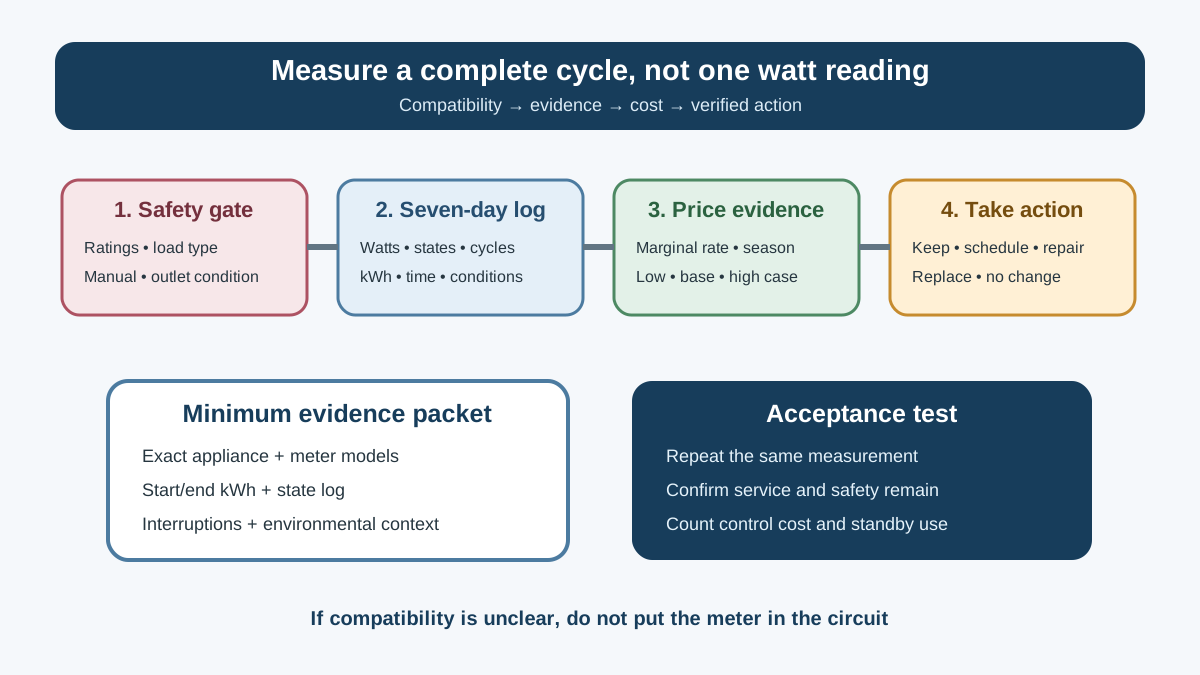
Short Answer: Use an energy-monitoring smart plug only when the meter and connected appliance are explicitly compatible in voltage, current, power, plug, motor/compressor load, environment, and switching instructions. Record instantaneous watts, accumulated kWh, time, and appliance operating state for a complete representative cycle—often seven days for refrigerators and other cycling loads. Then reprice the kWh with your local marginal electricity rate. Measurement is useful only if it leads to a safe keep, schedule, repair, or replace decision.
Do not place a generic smart plug on a space heater, air conditioner, dehumidifier, refrigerator, sump pump, medical device, cooking appliance, EV charger, or other high-power/critical load unless both manufacturers expressly allow that exact use. Monitoring without remote switching may still require a differently rated instrument. When in doubt, stop and use model-label data or qualified circuit measurement.
The Seven-Day Measurement Map
Use this record for each load:
| Field | Entry |
|---|---|
| Appliance and exact model | |
| Meter/smart plug exact model | |
| Voltage, current, power and load compatibility | |
| Manufacturer permits plug-through meter/switch | |
| Outlet and plug condition | |
| Start/end timestamps | |
| Start/end accumulated kWh | |
| Lowest stable/standby watts | |
| Typical active watts | |
| Highest observed watts (not assumed inrush) | |
| Operating states and cycle count | |
| Room/outdoor conditions where relevant | |
| Interruptions, resets, outages | |
| Local marginal rate | |
| Annualized low/base/high cost | |
| Action and verification date |
The log prevents the app graph from becoming a novelty. It also creates evidence for a repair technician or replacement worksheet.
Decide Whether a Plug-Through Meter Is Appropriate
A smart plug is an electrical device in series with the load. Its marketing wattage is not the only limit. Verify:
- supply voltage and frequency;
- plug and receptacle configuration;
- continuous current and power limits;
- resistive versus motor, compressor, transformer, or capacitive-load rating;
- any inrush limitation;
- indoor/dry-location or environmental rating;
- grounding path;
- whether switching can occur locally if the network fails;
- enclosure clearance and heat dissipation;
- listing/certification marks appropriate to your jurisdiction;
- appliance instructions on adapters, extension devices, timers, and remote switching.
The lowest rating in the chain controls. A 15-amp wall circuit does not make a 10-amp smart plug suitable for a 12-amp load. A device that measures a load is not automatically approved to interrupt it.
Inspect the receptacle and plug first. Stop if there is discoloration, melting, looseness, buzzing, crackling, damaged insulation, missing ground, moisture, or unusual heat. Do not stack adapters, place the device under a rug or furniture, or use it where its enclosure blocks an adjacent receptacle improperly.
Loads that deserve special caution
Heating and cooking loads: Space heaters, kettles, hot plates, toaster ovens, coffee makers, and similar devices can operate near circuit or plug limits. Remote energizing can also create an unattended heat source. CPSC emphasizes keeping space heaters away from combustible materials and turning them off before sleep; a schedule is not a substitute for supervision or the product's safety controls.
Compressors and motors: Refrigerators, freezers, room air conditioners, dehumidifiers, pumps, and power tools can have starting characteristics not represented by steady watts. Confirm the meter's load rating and the appliance manual. Do not repeatedly cut power as an “experiment”; compressors may require delay and controlled restart logic.
Critical loads: Do not add a consumer cloud-dependent control to medical devices, sump pumps, life-safety equipment, essential refrigeration, networking required for emergency communication, or other loads where an unintended off state creates material harm.
Hardwired and high-voltage loads: Central HVAC, water heaters, ranges, dryers, permanently connected equipment, and EV charging require appropriate circuit-level measurement. Do not open a panel or improvise a plug conversion. A qualified person can select and install suitable monitoring.
Smart Plug, Basic Meter, or Circuit Monitor?
Choose the least complex tool that safely answers the question.
| Tool | Best use | Main limits |
|---|---|---|
| Plug-in energy meter | Short local measurement of compatible cord-connected loads | No remote control; rating and accuracy still matter |
| Energy-monitoring smart plug | Logging, schedules, alerts, or local automation for explicitly compatible loads | Network, privacy, standby power, relay, and cloud failure |
| Smart power strip | Grouped electronics and controlled peripheral outlets | Master/control logic can interrupt devices unexpectedly |
| Circuit submeter | Larger, hardwired, or multi-outlet loads | Installation and interpretation require appropriate expertise |
| Utility interval data | Whole-home timing and bill reconciliation | Does not identify every appliance by itself |
| EnergyGuide/model data | Standardized model comparison | Based on test assumptions, not site operation |
ENERGY STAR's smart-home energy-management criteria recognize plug-load monitoring/control as one component of a larger system and set requirements such as energy reporting and a standby-power limit for included devices. That does not mean every individual retail smart plug carries device-specific ENERGY STAR certification. Verify claims precisely.
What the Measurements Mean
Watts are a rate
A watt is instantaneous power. It answers “how fast is this device using energy now?” It does not answer annual cost until time is included.
Kilowatt-hours are accumulated energy
kWh = average kW × hours
A stable 8-watt standby load for 24 hours uses:
0.008 kW × 24 h = 0.192 kWh/day
Over 365 days, if truly unchanged:
0.192 × 365 = 70.1 kWh/year
At an illustrative $0.20/kWh, that is $14.02/year. Use your actual marginal rate and measured behavior. Many devices change modes, update, sleep, cycle, or respond to temperature, so accumulated kWh is more reliable than one watt reading.
Power factor and apparent power
Some meters display volts, amps, watts, volt-amperes, and power factor. Utility residential bills generally charge energy in kWh, though tariffs differ. Watts represent real power; volts × amps gives apparent power for an AC load. Do not use the amp reading alone to estimate energy without understanding power factor and time.
Starting current
A consumer plug may refresh too slowly to capture a brief motor inrush accurately. “Peak watts” in an app may be a sampled value, not a certified starting-current measurement. Use it only within the instrument's documented capability.
Follow a Repeatable Measurement Protocol
Step 1: Define the decision
Write one question:
- What does this entertainment setup use when active, asleep, and off?
- Is the garage freezer's measured cost material enough to justify diagnosis or replacement?
- Does a schedule reduce a printer or coffee-station standby load without harming operation?
- How much energy does a dehumidifier use during a representative humid week?
Do not begin with “find vampires.” Begin with a load and an action threshold.
Step 2: Establish compatibility
Photograph both nameplates and read both manuals. Record the required voltage, amps, watts, frequency, plug, warnings, and allowed controls. A nameplate maximum is not a forecast of energy; it is a compatibility and safety input.
Step 3: Reset and timestamp
Confirm the meter's clock, time zone, daylight-saving behavior, and accumulated-energy reset. Record starting kWh and time. If data lives only in a cloud app, export or screenshot it before testing another load.
Step 4: Log stable standby correctly
DOE's standby measurement guidance distinguishes stable from fluctuating power. If power is stable, a reading can represent the state; if it fluctuates, measure energy over time and divide by the measurement duration to find average power. A phone charger with no phone, a television in network standby, and a computer asleep may enter different states only after a delay.
Record the state and the time since last interaction. Do not call an active network update “off.”
Step 5: Capture representative operation
For a refrigerator or freezer, seven days can capture door openings, defrost, compressor cycles, room temperature, and weekend use better than one hour. For a dishwasher, washer, dryer, or coffee appliance, record several representative cycles and selected programs. For electronics, capture workday and weekend states.
Do not annualize a heat-wave dehumidifier week as a typical year. Build seasonal scenarios.
Step 6: Check data integrity
Note power outages, Wi-Fi loss, app resets, clock errors, unplugging, firmware updates, and household behavior changes. Compare accumulated meter kWh with the integral of the graph when both are available. If the device reports implausible zero or negative values, retest before acting.
Step 7: Remove the meter safely
Follow shutdown instructions. Do not pull under load where the appliance manual requires a controlled shutdown. Inspect the smart plug and receptacle for unusual heat or discoloration. Restore the appliance directly to its intended supply when the test is complete unless ongoing control is explicitly safe and useful.
Convert a Test Into Annual Scenarios
For a seven-day measurement of 5.6 kWh:
Average daily energy = 5.6 ÷ 7 = 0.8 kWh/day
Simple annualization:
0.8 × 365 = 292 kWh/year
At $0.20/kWh:
292 × $0.20 = $58.40/year
That is a base-case method, not a claim. For a garage freezer, create temperature cases:
| Scenario | Days | Measured/estimated kWh/day | Annual kWh contribution |
|---|---|---|---|
| Cool season | 150 | ||
| Mild season | 125 | ||
| Hot season | 90 |
For time-of-use rates, assign measured energy to the correct tariff intervals. Scheduling can reduce cost without reducing kWh. Use the interval-data TOU guide to model the complete tariff.
Choose an Action Threshold Before the Test
Measurement creates value only when paired with a decision:
| Finding | Possible action | Verification |
|---|---|---|
| Stable avoidable standby on peripherals | switched power strip or device sleep setting | repeat 48-hour test |
| Computer never enters expected sleep | diagnose software/wake settings | verify state and kWh |
| Refrigerator energy unexpectedly high | check temperature, seals, coils, room conditions, fault symptoms | retest after correction |
| Dehumidifier runs continuously | check moisture source, placement, setpoint, drainage, capacity and frost | log RH and kWh together |
| Coffee equipment holds heat unused | manufacturer-approved timer or manual routine | confirm safe restart and energy |
| Small savings below device's own standby/cost | remove automation | document no-action decision |
Do not replace a working appliance from kWh alone. Compare installation, capacity, repair, new-model EnergyGuide data, food or service risk, and disposal. The appliance life-cycle worksheet provides that boundary.
Measure Refrigerators and Freezers Carefully
Refrigeration energy changes with ambient temperature, door openings, food loading, setpoint, frost, ventilation clearance, dirty condenser surfaces, gaskets, fans, defrost, and faults.
During the test, log:
- refrigerator and freezer temperatures with suitable instruments;
- room/garage temperature;
- door-open or heavy-use events;
- defrost-related power patterns if identifiable;
- unusual noise, frost, condensation, or hot surfaces;
- meter interruptions.
Do not power-cycle a compressor repeatedly. If a warm-food condition exists, prioritize food safety and diagnosis. Use the refrigerator repair-versus-replace worksheet after establishing the fault and measured energy.
Measure Dehumidifiers With Humidity Evidence
A dehumidifier's energy cannot be interpreted without moisture conditions. Log relative humidity away from direct discharge, room temperature, water removed or drain flow, compressor/fan states, doors/windows, and weather. A unit can consume a great deal because the building has an active moisture source, because it is undersized, because airflow is blocked, or because its sensor/control is wrong.
Do not place a generic smart plug on the unit unless explicitly compatible. Do not automate it with a remote humidity sensor unless the appliance permits external power interruption and resumes safely. Diagnose placement, capacity, drainage, and controls with the portable dehumidifier sizing guide.
Use Smart Schedules Selectively
A safe schedule needs more than an app timer:
- the appliance allows external switching;
- unattended restart is acceptable;
- time and schedule survive or fail safely after an outage;
- manual override remains available;
- occupants know the controlled outlet;
- the network/cloud is not required for a safety-critical state;
- the smart plug's own standby use does not exceed the avoided load;
- firmware and account security are maintained.
Computers, game consoles, storage devices, and printers may require an orderly software shutdown. Refrigerators, pumps, routers, medical devices, alarms, and moisture-control equipment may need continuous availability. Coffee makers and heaters can create unattended heat. If the device was not designed for power interruption, change its native settings rather than cutting supply.
Privacy and Security Checklist
Energy patterns can reveal occupancy and routines. Before connecting a meter:
- read what data is collected, retained, sold, or shared;
- determine whether local control and local history work without cloud access;
- use a unique password and multi-factor authentication where offered;
- keep the app, hub, and firmware supported and updated;
- separate or secure IoT devices using router features you understand;
- revoke integrations no longer used;
- export needed history before deleting an account;
- plan for service shutdown or vendor abandonment.
Do not upload a full household data file to an unknown calculator merely to multiply kWh by price. A local spreadsheet is sufficient.
Screen the Meter Before Trusting Small Differences
A consumer monitor can be useful without being laboratory equipment. Read its documented accuracy range, minimum measurable power, sampling interval, accumulated-energy resolution, voltage range, and treatment of power factor. Accuracy may be stated as a percentage plus a fixed number of watts, which matters when comparing tiny standby loads.
Perform non-invasive reasonableness checks only with compatible loads:
- Leave the monitor powered with no connected appliance and record whether it reports zero load while its own standby remains outside the measured outlet.
- Test a stable, manufacturer-compatible load for long enough to avoid display rounding.
- Compare accumulated kWh over several hours with average watts × time; expect small differences from sampling and state changes.
- Repeat the same appliance state twice and note variation.
- If two meters are available, compare them without daisy-chaining devices unless their instructions expressly permit it.
Do not use a household appliance as a precision reference merely because its nameplate lists watts. Nameplate values often describe rating or maximum input, not a stable calibration load. If the decision turns on a difference near the meter's uncertainty, report “not distinguishable with this tool” and choose a longer test or more appropriate instrument.
A Purchase Checklist for a Monitoring Plug
Choose by the measurement and safety job, not the app's screenshots. Record:
- listing/certification appropriate to the jurisdiction;
- exact continuous and load-type ratings;
- accumulated kWh, instantaneous real watts, and export format;
- documented accuracy and low-power threshold;
- local schedule and local control behavior when internet is unavailable;
- power-outage recovery and default relay state;
- manual control and visible state indication;
- standby consumption of the monitoring device;
- data retention, privacy, security updates, and account requirements;
- physical size, grounding, enclosure, and receptacle fit;
- warranty, recall path, and support life.
Matter, Thread, Wi-Fi, Bluetooth, Zigbee, or a proprietary radio describes connectivity, not metering accuracy or load safety. A local protocol can reduce some cloud dependence, but the specific platform may still require an account for setup, history, or automation. Verify actual behavior for the model and software version you will use.
Prioritize the Loads Worth Measuring
Start where a finding can change a decision. A simple priority score can use:
priority = suspected annual kWh × uncertainty × actionability
The factors do not need false numerical precision. A cycling garage freezer has meaningful uncertainty and a repair/replace decision, so it ranks high. A clock using a known tiny amount with no safe control option ranks low. Other strong candidates include entertainment clusters that fail to sleep, frequently used office equipment, seasonal dehumidifiers, aquariums, pumps appropriate for the meter, and appliance faults already under diagnosis.
Rotate one compatible meter rather than buying a permanent monitor for every outlet. Measure the top candidate, act, verify, and move on. Maintain a household load register with appliance model, measurement date, seasonal context, kWh/day, and next-review trigger. This turns scattered tests into a durable energy inventory.
Verify Savings After the Change
Repeat the same measurement window after changing a setting, repairing a fault, or installing a control. Hold relevant conditions as similar as practical. Report both energy and service:
- kWh before and after;
- days/hours observed;
- operating state and schedule;
- temperature/humidity where relevant;
- lost functionality or occupant overrides;
- meter's own standby power;
- total cost of the intervention.
If a $30 smart plug plus its own energy avoids $4 per year, the economic case differs from a free native sleep setting. If a control causes missed cycles, food warming, condensation, data loss, or occupant workarounds, it failed even if the app reports fewer kWh.
Common Measurement Errors
Reading watts once
One sample misses cycles and changing states. Use accumulated kWh over a representative period.
Applying the bill's average price blindly
Fixed charges often do not change with appliance energy. Use the relevant marginal rate and tariff period.
Assuming the app is revenue-grade
Consumer meters vary in accuracy, sampling, treatment of low loads, and power factor. Check specifications and use results at appropriate precision.
Confusing remote control with energy savings
Control only saves when it changes wasteful operation without shifting it elsewhere or degrading service.
Ignoring seasonal conditions
Garage refrigeration, dehumidification, cooling, and heating-related loads need seasonal cases.
Measuring an incompatible load
No cost insight justifies overheating a connector, interrupting a critical device, or violating instructions.
Frequently Asked Questions
How long should I measure an appliance?
Measure long enough to capture representative states. A stable standby state may need minutes after settling; electronics may need several days; refrigeration and moisture-control loads often need at least a representative week plus seasonal cases.
Can I use a smart plug on a refrigerator?
Only when both the meter and refrigerator documentation support that exact plug-through use and load type. Avoid remote power cycling. If compatibility is unclear, use label data or suitable professional measurement.
Is one watt of standby worth chasing?
One continuous watt is about 8.76 kWh/year by arithmetic: 1 W × 8,760 hours ÷ 1,000. Price it locally, compare it with the control device's own energy and cost, and prioritize larger safe opportunities first. DOE explains suitable measurement methods in its standby-power guide.
Why does the smart plug show amps but low watts?
AC loads can have power factor below one. Real power in watts can be lower than volts × amps. Use the meter's documented real-energy measurement for kWh calculations.
Can a smart plug control a space heater?
Do not assume so. Space heaters are high-power heat sources with important supervision and clearance rules. Follow the heater and control instructions and CPSC safety guidance; a cloud schedule is not a safety control.
Does scheduling reduce energy or only cost?
It may do either. Moving the same cycle to off-peak hours changes cost but not kWh. Eliminating avoidable standby or runtime can reduce kWh. Measure both.
Should I install a whole-home monitor instead?
Use circuit or whole-home monitoring for hardwired and large loads or when the question spans several circuits. Installation inside an electrical panel belongs to a qualified person. Utility interval data may answer timing questions without new hardware.
What to Read Next
Reconcile measured loads with the electric-bill reading guide, price schedules with the TOU interval model, compare a high-use refrigerator through the repair-versus-replace worksheet, and evaluate moisture-control energy with the portable dehumidifier sizing and placement guide.
Sources and Verification
Standby measurement and plug-load controls use DOE FEMP and DOE Better Buildings. Connected-system and scheduling context uses ENERGY STAR SHEMS criteria and smart-appliance guidance. Safety and recall checks use CPSC safety alerts and the relevant exact-model recall notice. Replacement comparisons use the FTC EnergyGuide explanation. The meter and appliance manuals, nameplates, load waveform, environment, circuit condition, local rate, and field observations govern.
About the Editorial Team EnergyBS reviews public program rules, product specifications, utility rates, and reader-facing cost assumptions. Treat savings figures as estimates until you verify local prices, permits, rebates, and contractor quotes.
Sources and Verification
- DOE FEMP: Measuring Standby Power
- DOE Better Buildings: Smart Outlets and Wireless Meter/Control Systems
- ENERGY STAR: Smart Home Energy Management Systems Key Product Criteria
- ENERGY STAR: Smart Appliances
- CPSC: Safety Alerts
- CPSC: Air Conditioner Recalls
- CPSC: Dehumidifier Recalls
- FTC: How to Use the EnergyGuide Label
Editorial Review
EnergyBS Editorial Team
EnergyBS publishes practical homeowner guides. Important program, product, and cost claims should be checked against the linked source and local project documents before you commit to work.
Related Guides
View All ArticlesHow to Read Your Electric Bill 2026 Tool (Guide & Data)
Your electric bill is full of confusing charges, fees, and acronyms. Here's a linebyline breakdown of what you're actually paying for—and where to find savings.
Are TimeofUse Rates Worth It? Model Your Bill From
Use a year of interval data and current tariff rules to compare flat and timeofuse electricity plans. Includes a bill model, loadshift inventory, demandcharge check, and trial scorecard.
Refrigerator Repair vs. Replace 2026 Tool (Guide & Data)
A diagnosisfirst refrigerator repairversusreplace worksheet that compares the full installed decision, EnergyGuide operating cost, foodloss risk, warranties, fit, serviceability, and responsible disposal.